Effective monitoring requires more than just checking if your website loads. Modern infrastructure has multiple layers, each with potential failure points. Understanding the different types of monitoring—and when to use each—is essential for comprehensive coverage.
Think of monitoring as layers of verification, each checking a different aspect of your infrastructure.
At the base, network-level checks verify basic connectivity. Above that, protocol-specific monitors verify services are responding correctly. At the top, application-level monitoring verifies that your software functions as expected.
Each layer catches different types of problems. Relying on just one type leaves blind spots that can cause extended outages.
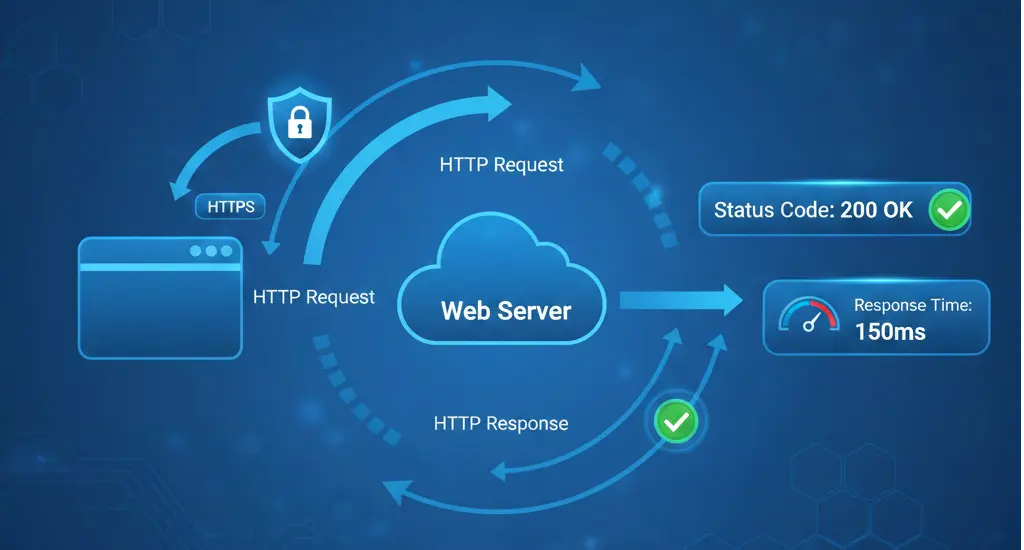 HTTP monitoring is the most common and essential type of uptime monitoring. It checks whether your website responds to web requests correctly.
An HTTP monitor sends a request to your URL—just like a web browser would—and checks the response. It verifies the server returns an appropriate status code, responds within an acceptable time, and optionally contains expected content.
Status Codes
The most basic check verifies your server returns a 200 OK status (or another expected code). Status codes in the 4xx range indicate client errors (like 404 Not Found), while 5xx codes indicate server errors.
Response Time
How quickly does your server respond? Slow response times degrade user experience and can indicate performance problems before they become outages.
Content Verification
Advanced HTTP monitoring can verify the response contains specific text or elements. This catches situations where the server responds but returns an error page or incorrect content.
SSL/TLS Verification
For HTTPS monitoring, the check also verifies the SSL certificate is valid and the connection is secure.
Use HTTP/HTTPS monitoring for any web-facing service: websites, web applications, APIs, webhooks, and any service that communicates over HTTP.
This should be your primary monitoring type for most web services.
Set check intervals based on criticality. Production websites should be checked every 1-3 minutes. Less critical services can use 5-10 minute intervals.
Always verify specific status codes rather than just "any successful response." An unexpected 301 redirect might indicate a problem.
Consider adding content verification for critical pages. A server might return 200 OK while actually displaying an error message.
TCP monitoring checks if a specific port on a server is open and accepting connections. It's more basic than HTTP monitoring but essential for non-HTTP services.
A TCP monitor attempts to establish a connection to a specific IP address and port. If the connection succeeds, the service is considered up. It doesn't verify what the service does—just that it's listening and accepting connections.
Port Availability
Can a connection be established to the specified port? This verifies the service is running and the firewall allows access.
Connection Time
How long does it take to establish the connection? Slow connections might indicate network or server issues.
Use TCP monitoring for services that don't speak HTTP:
- Database servers (MySQL 3306, PostgreSQL 5432, MongoDB 27017)
- Mail servers (SMTP 25/587, IMAP 143/993, POP3 110/995)
- Game servers
- Custom application servers
- SSH access (port 22)
- FTP servers (port 21)
TCP monitoring is also useful as a lightweight check for services where you don't need full protocol verification.
Always specify the correct port for your service. Default ports can vary by configuration.
Consider what "up" really means for each service. A database accepting connections doesn't guarantee it's functioning correctly—just that it's listening.
Use TCP monitoring alongside protocol-specific monitoring for critical services. TCP tells you the service is running; protocol monitoring tells you it's working correctly.
Ping monitoring uses ICMP echo requests to check basic network connectivity to a host. It's the most fundamental type of monitoring.
A ping monitor sends an ICMP echo request to the target host and waits for an echo reply. Success indicates the host is reachable over the network.
Host Reachability
Can packets reach the destination? This verifies basic network connectivity between the monitoring location and the target.
Round Trip Time
How long does the packet take to reach the destination and return? This measures network latency.
Packet Loss
What percentage of packets fail to return? Packet loss indicates network congestion or routing problems.
Use ping monitoring for:
- Basic server availability checking
- Network infrastructure monitoring (routers, switches)
- Connectivity verification between locations
- Baseline network health monitoring
Ping monitoring has significant limitations. Many firewalls block ICMP traffic, causing false negatives. A host might respond to ping while its services are down. And ping doesn't tell you anything about application functionality.
Never rely on ping as your only monitoring type. It's useful as a baseline check but should be combined with service-specific monitoring.
If using ping monitoring, verify ICMP traffic is allowed through all firewalls between your monitoring location and target.
Use ping alongside other monitoring types, not as a replacement. It's best as an additional data point for troubleshooting.
Consider packet loss thresholds. Occasional packet loss might be acceptable, but consistent loss indicates problems.
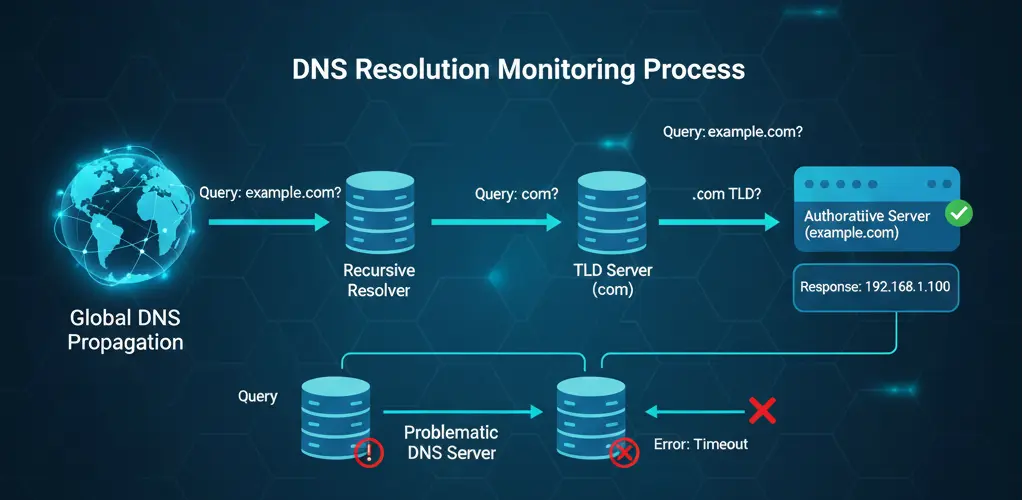 DNS monitoring verifies that your domain names resolve correctly to the right IP addresses. It's a critical but often overlooked type of monitoring.
A DNS monitor queries DNS servers for your domain's records and verifies they return expected values. It can check various record types: A, AAAA, CNAME, MX, TXT, and others.
Record Accuracy
Does the DNS record return the correct value? An A record should resolve to your server's IP address. MX records should point to your mail servers.
Resolution Time
How quickly do DNS servers respond? Slow DNS resolution delays every user connection.
Propagation
Are DNS changes propagated globally? Different DNS servers might return different results during propagation.
DNSSEC Validation
If using DNSSEC, is the cryptographic validation working correctly?
Every production domain should have DNS monitoring. DNS failures make your entire online presence unreachable, even if your servers are functioning perfectly.
DNS monitoring is especially critical:
- After making DNS changes
- When using multiple DNS providers
- For email delivery (MX records)
- For services using CNAME records
Many organizations invest heavily in server redundancy but overlook DNS as a potential failure point. If your DNS provider goes down or your records are misconfigured, no amount of server redundancy helps.
DNS failures are also invisible to most application monitoring. Your HTTP monitor might report "down" when the actual problem is DNS resolution—critical information for fast troubleshooting.
Monitor A/AAAA records for all critical domains. Also monitor MX records if you handle email.
Check from multiple geographic locations. DNS resolution can vary by region.
Set expected values and alert when they change unexpectedly. DNS hijacking attacks modify records to redirect traffic to malicious servers.
Monitor multiple nameservers if you have them. Inconsistencies between nameservers cause intermittent failures that are hard to diagnose.
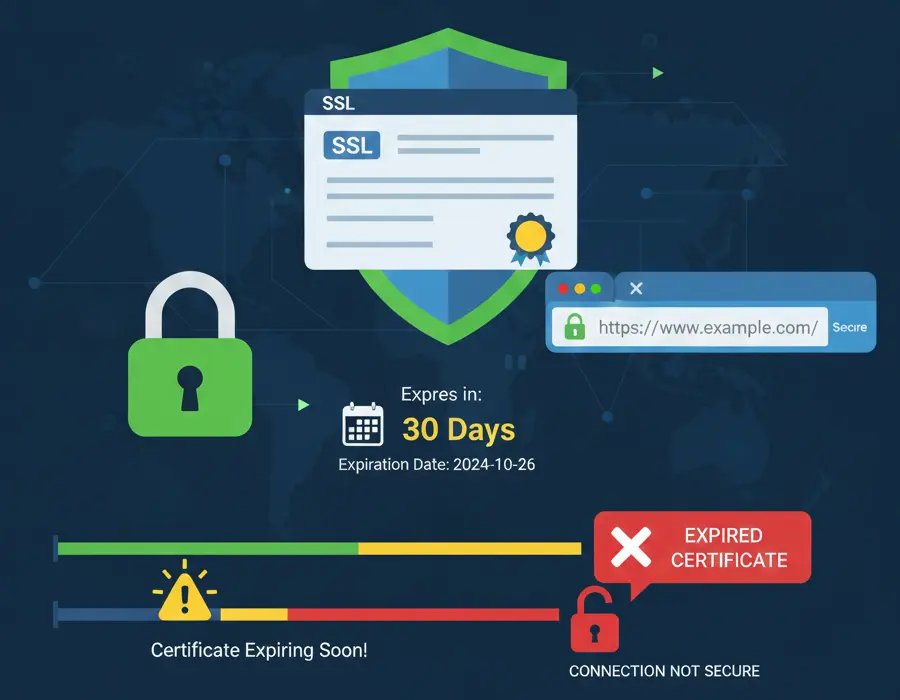 SSL certificate monitoring tracks your certificates' expiration dates and validity. Expired certificates cause browser warnings that effectively make your site unusable.
An SSL monitor connects to your server and examines the SSL/TLS certificate. It verifies the certificate is valid, trusted, and not expired or expiring soon.
Expiration Date
When does the certificate expire? Most monitors alert when certificates approach expiration, giving you time to renew.
Certificate Validity
Is the certificate valid for the domain being accessed? Mismatched domains cause browser warnings.
Chain of Trust
Is the certificate chain complete and trusted? Missing intermediate certificates cause validation failures in some browsers.
Protocol Support
Which TLS versions does the server support? Older protocols like TLS 1.0 and 1.1 are deprecated and should be disabled.
Every HTTPS endpoint should have SSL certificate monitoring. Certificate expiration is one of the most common causes of preventable outages.
Certificate expiration seems like it should never catch anyone by surprise—it's a known date. Yet it happens constantly.
Teams change. The person who installed the certificate may have left the organization, and their reminders go to an unmonitored inbox.
Automation fails. Auto-renewal is great until it doesn't work. A failed renewal might go unnoticed until the certificate expires.
Shadow IT proliferates. Certificates installed by individual teams or departments may not be centrally tracked.
Set multiple alert thresholds: 30 days, 14 days, and 7 days before expiration. Earlier alerts give more time for planned renewal.
Include all endpoints. Wildcard certificates still need monitoring. Different servers might have different expiration dates even for the same domain.
Verify the entire chain. The leaf certificate might be fine while an intermediate certificate is expiring or revoked.
Database monitoring verifies your database servers are accessible and performing correctly. Databases are often the most critical component of modern applications.
Database monitors connect to your database server and optionally execute test queries. They verify connectivity, authentication, and basic functionality.
Connectivity
Can a connection be established? This catches database server crashes, network issues, and authentication problems.
Query Execution
Can queries be executed successfully? This verifies the database is functional, not just running.
Response Time
How quickly do queries execute? Slow queries indicate performance problems.
Connection Availability
Are connections available from the pool? Connection exhaustion is a common cause of application failures.
Any application with a database backend should have database monitoring. This includes:
- Production databases
- Replica databases
- Database-as-a-service endpoints (RDS, Cloud SQL, etc.)
Basic database monitoring checks connectivity, but production databases need deeper monitoring:
- Replication lag between primary and replica
- Query performance and slow queries
- Table sizes and index health
- Lock contention and deadlocks
- Connection pool usage
Consider dedicated database monitoring tools for comprehensive coverage.
Use dedicated monitoring credentials with minimal permissions. Never use production application credentials for monitoring.
Test actual query execution when possible. A database can accept connections while being unable to execute queries.
Monitor from the same locations as your application servers. Network issues between application and database affect your users.
API monitoring verifies your API endpoints respond correctly with valid data. It goes beyond HTTP monitoring by validating response content and structure.
API monitors send requests to your endpoints and validate the responses. They check status codes, response times, and response body content including JSON/XML structure and specific values.
Endpoint Availability
Does the endpoint respond to requests?
Response Validity
Does the response contain valid, correctly structured data? An endpoint might return 200 OK with invalid JSON or missing required fields.
Response Time
How quickly does the API respond? Slow APIs degrade user experience and may timeout in client applications.
Authentication
Do authenticated endpoints accept valid credentials and reject invalid ones?
Any API you provide or depend on should be monitored:
- Public APIs you provide to customers
- Internal APIs between your services
- Third-party APIs your application depends on
- Webhook endpoints
Test realistic scenarios. Monitor the same endpoints and payloads your applications use.
Validate response structure. Schema validation catches issues that simple status code checks miss.
Test error scenarios. Verify your API returns appropriate errors for invalid requests.
Monitor third-party APIs separately. When issues occur, you need to quickly identify whether the problem is your code or a dependency.
Email monitoring verifies your mail servers are accessible and functioning. Email failures are often invisible until someone complains about missing messages.
SMTP Monitoring
Verifies your outbound mail server accepts connections and can send mail. Critical for transactional email and notifications.
IMAP/POP3 Monitoring
Verifies your mail storage servers are accessible. Important for email clients and webmail access.
Mail Flow Monitoring
Actually sends a test email and verifies it arrives. This catches issues that port checks miss.
Monitor email infrastructure if you:
- Run your own mail servers
- Rely on email for critical notifications
- Provide email services to users
- Send transactional email (receipts, password resets, etc.)
Monitor both sending (SMTP) and receiving (IMAP/POP3). Issues with either side cause different symptoms.
Consider end-to-end mail flow testing for critical email paths. Port monitoring doesn't guarantee mail actually delivers.
Monitor blacklist status separately. Your server might be up but blacklisted, causing delivery failures.
No single monitoring type provides complete coverage. Effective monitoring combines multiple types to cover all failure modes.
For a typical web application, start with:
- HTTPS monitoring of your main endpoints
- SSL certificate monitoring for all certificates
- DNS monitoring for your primary domains
- Database monitoring for your data stores
Once basics are covered, add:
5. TCP monitoring for non-HTTP services
6. API monitoring with content validation
7. Synthetic monitoring for critical user flows
8. Email monitoring if you handle mail
Geographic distribution is critical. Check from multiple regions to catch:
- CDN issues affecting specific regions
- Network routing problems
- Regional infrastructure failures
- Geographic-specific DNS resolution
Different services need different check intervals and alert thresholds:
- Critical production: 1-minute checks, immediate alerts
- Standard production: 3-5 minute checks, 2-3 failure alerts
- Staging/development: 10-15 minute checks, delayed alerts
UptimeBolt provides comprehensive monitoring across all the types discussed:
HTTP/HTTPS Monitoring
Full HTTP monitoring with status code verification, response time tracking, content validation, and SSL checks.
TCP Port Monitoring
Verify any TCP service is accepting connections.
DNS Monitoring
Monitor all DNS record types from multiple global locations.
SSL Certificate Monitoring
Track certificate expiration with configurable alert thresholds.
Database Monitoring
Connect to PostgreSQL, MySQL, MongoDB, and other databases to verify connectivity and performance.
API Monitoring
Validate API responses with JSON schema checking and custom assertions.
All monitoring types are available from 30 global locations, with AI-powered prediction to alert you before issues affect users.
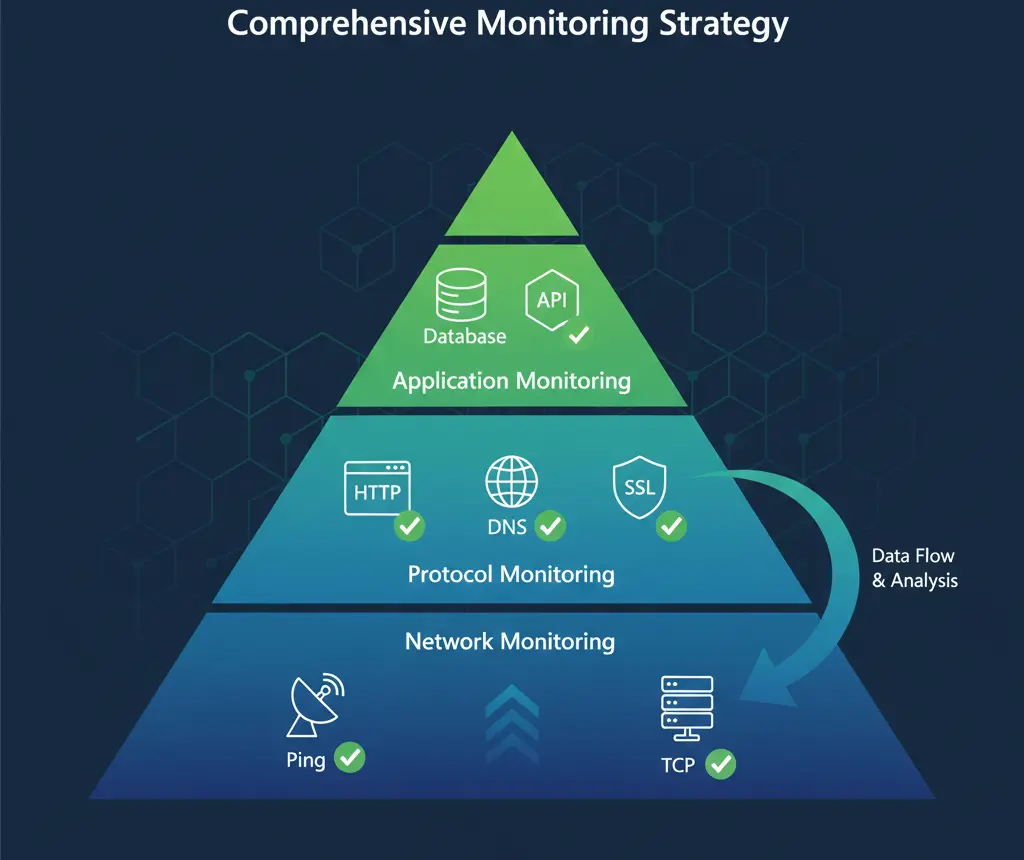
Comprehensive monitoring requires understanding the different types available and when to use each. HTTP monitoring alone isn't enough—you need DNS monitoring to ensure users can find you, SSL monitoring to keep your site secure, database monitoring to protect your data layer, and more.
The good news is you don't need to build this yourself. Modern monitoring platforms like UptimeBolt provide all these monitoring types in a single, easy-to-use interface.
Start by identifying your critical services and the monitoring types each needs. Then build out from there, adding depth and coverage as your infrastructure grows.
Remember: the goal isn't to monitor everything, it's to monitor everything that matters.

Effective monitoring requires more than just checking if your website loads. Modern infrastructure has multiple layers, each with potential failure points. Understanding the different types of monitoring—and when to use each—is essential for comprehensive coverage.
Overview: The Monitoring Stack
Think of monitoring as layers of verification, each checking a different aspect of your infrastructure.
At the base, network-level checks verify basic connectivity. Above that, protocol-specific monitors verify services are responding correctly. At the top, application-level monitoring verifies that your software functions as expected.
Each layer catches different types of problems. Relying on just one type leaves blind spots that can cause extended outages.
HTTP/HTTPS Monitoring
How It Works
An HTTP monitor sends a request to your URL—just like a web browser would—and checks the response. It verifies the server returns an appropriate status code, responds within an acceptable time, and optionally contains expected content.
What It Checks
Status Codes The most basic check verifies your server returns a 200 OK status (or another expected code). Status codes in the 4xx range indicate client errors (like 404 Not Found), while 5xx codes indicate server errors.
Response Time How quickly does your server respond? Slow response times degrade user experience and can indicate performance problems before they become outages.
Content Verification Advanced HTTP monitoring can verify the response contains specific text or elements. This catches situations where the server responds but returns an error page or incorrect content.
SSL/TLS Verification For HTTPS monitoring, the check also verifies the SSL certificate is valid and the connection is secure.
When to Use
Use HTTP/HTTPS monitoring for any web-facing service: websites, web applications, APIs, webhooks, and any service that communicates over HTTP.
This should be your primary monitoring type for most web services.
Configuration Best Practices
Set check intervals based on criticality. Production websites should be checked every 1-3 minutes. Less critical services can use 5-10 minute intervals.
Always verify specific status codes rather than just "any successful response." An unexpected 301 redirect might indicate a problem.
Consider adding content verification for critical pages. A server might return 200 OK while actually displaying an error message.
TCP Port Monitoring
TCP monitoring checks if a specific port on a server is open and accepting connections. It's more basic than HTTP monitoring but essential for non-HTTP services.
How It Works
A TCP monitor attempts to establish a connection to a specific IP address and port. If the connection succeeds, the service is considered up. It doesn't verify what the service does—just that it's listening and accepting connections.
What It Checks
Port Availability Can a connection be established to the specified port? This verifies the service is running and the firewall allows access.
Connection Time How long does it take to establish the connection? Slow connections might indicate network or server issues.
When to Use
Use TCP monitoring for services that don't speak HTTP:
TCP monitoring is also useful as a lightweight check for services where you don't need full protocol verification.
Configuration Best Practices
Always specify the correct port for your service. Default ports can vary by configuration.
Consider what "up" really means for each service. A database accepting connections doesn't guarantee it's functioning correctly—just that it's listening.
Use TCP monitoring alongside protocol-specific monitoring for critical services. TCP tells you the service is running; protocol monitoring tells you it's working correctly.
Ping (ICMP) Monitoring
Ping monitoring uses ICMP echo requests to check basic network connectivity to a host. It's the most fundamental type of monitoring.
How It Works
A ping monitor sends an ICMP echo request to the target host and waits for an echo reply. Success indicates the host is reachable over the network.
What It Checks
Host Reachability Can packets reach the destination? This verifies basic network connectivity between the monitoring location and the target.
Round Trip Time How long does the packet take to reach the destination and return? This measures network latency.
Packet Loss What percentage of packets fail to return? Packet loss indicates network congestion or routing problems.
When to Use
Use ping monitoring for:
Limitations
Ping monitoring has significant limitations. Many firewalls block ICMP traffic, causing false negatives. A host might respond to ping while its services are down. And ping doesn't tell you anything about application functionality.
Never rely on ping as your only monitoring type. It's useful as a baseline check but should be combined with service-specific monitoring.
Configuration Best Practices
If using ping monitoring, verify ICMP traffic is allowed through all firewalls between your monitoring location and target.
Use ping alongside other monitoring types, not as a replacement. It's best as an additional data point for troubleshooting.
Consider packet loss thresholds. Occasional packet loss might be acceptable, but consistent loss indicates problems.
DNS Monitoring
How It Works
A DNS monitor queries DNS servers for your domain's records and verifies they return expected values. It can check various record types: A, AAAA, CNAME, MX, TXT, and others.
What It Checks
Record Accuracy Does the DNS record return the correct value? An A record should resolve to your server's IP address. MX records should point to your mail servers.
Resolution Time How quickly do DNS servers respond? Slow DNS resolution delays every user connection.
Propagation Are DNS changes propagated globally? Different DNS servers might return different results during propagation.
DNSSEC Validation If using DNSSEC, is the cryptographic validation working correctly?
When to Use
Every production domain should have DNS monitoring. DNS failures make your entire online presence unreachable, even if your servers are functioning perfectly.
DNS monitoring is especially critical:
The Hidden Single Point of Failure
Many organizations invest heavily in server redundancy but overlook DNS as a potential failure point. If your DNS provider goes down or your records are misconfigured, no amount of server redundancy helps.
DNS failures are also invisible to most application monitoring. Your HTTP monitor might report "down" when the actual problem is DNS resolution—critical information for fast troubleshooting.
Configuration Best Practices
Monitor A/AAAA records for all critical domains. Also monitor MX records if you handle email.
Check from multiple geographic locations. DNS resolution can vary by region.
Set expected values and alert when they change unexpectedly. DNS hijacking attacks modify records to redirect traffic to malicious servers.
Monitor multiple nameservers if you have them. Inconsistencies between nameservers cause intermittent failures that are hard to diagnose.
SSL Certificate Monitoring
How It Works
An SSL monitor connects to your server and examines the SSL/TLS certificate. It verifies the certificate is valid, trusted, and not expired or expiring soon.
What It Checks
Expiration Date When does the certificate expire? Most monitors alert when certificates approach expiration, giving you time to renew.
Certificate Validity Is the certificate valid for the domain being accessed? Mismatched domains cause browser warnings.
Chain of Trust Is the certificate chain complete and trusted? Missing intermediate certificates cause validation failures in some browsers.
Protocol Support Which TLS versions does the server support? Older protocols like TLS 1.0 and 1.1 are deprecated and should be disabled.
When to Use
Every HTTPS endpoint should have SSL certificate monitoring. Certificate expiration is one of the most common causes of preventable outages.
Why Certificates Expire Unexpectedly
Certificate expiration seems like it should never catch anyone by surprise—it's a known date. Yet it happens constantly.
Teams change. The person who installed the certificate may have left the organization, and their reminders go to an unmonitored inbox.
Automation fails. Auto-renewal is great until it doesn't work. A failed renewal might go unnoticed until the certificate expires.
Shadow IT proliferates. Certificates installed by individual teams or departments may not be centrally tracked.
Configuration Best Practices
Set multiple alert thresholds: 30 days, 14 days, and 7 days before expiration. Earlier alerts give more time for planned renewal.
Include all endpoints. Wildcard certificates still need monitoring. Different servers might have different expiration dates even for the same domain.
Verify the entire chain. The leaf certificate might be fine while an intermediate certificate is expiring or revoked.
Database Monitoring
Database monitoring verifies your database servers are accessible and performing correctly. Databases are often the most critical component of modern applications.
How It Works
Database monitors connect to your database server and optionally execute test queries. They verify connectivity, authentication, and basic functionality.
What It Checks
Connectivity Can a connection be established? This catches database server crashes, network issues, and authentication problems.
Query Execution Can queries be executed successfully? This verifies the database is functional, not just running.
Response Time How quickly do queries execute? Slow queries indicate performance problems.
Connection Availability Are connections available from the pool? Connection exhaustion is a common cause of application failures.
When to Use
Any application with a database backend should have database monitoring. This includes:
Beyond Connectivity
Basic database monitoring checks connectivity, but production databases need deeper monitoring:
Consider dedicated database monitoring tools for comprehensive coverage.
Configuration Best Practices
Use dedicated monitoring credentials with minimal permissions. Never use production application credentials for monitoring.
Test actual query execution when possible. A database can accept connections while being unable to execute queries.
Monitor from the same locations as your application servers. Network issues between application and database affect your users.
API Monitoring
API monitoring verifies your API endpoints respond correctly with valid data. It goes beyond HTTP monitoring by validating response content and structure.
How It Works
API monitors send requests to your endpoints and validate the responses. They check status codes, response times, and response body content including JSON/XML structure and specific values.
What It Checks
Endpoint Availability Does the endpoint respond to requests?
Response Validity Does the response contain valid, correctly structured data? An endpoint might return 200 OK with invalid JSON or missing required fields.
Response Time How quickly does the API respond? Slow APIs degrade user experience and may timeout in client applications.
Authentication Do authenticated endpoints accept valid credentials and reject invalid ones?
When to Use
Any API you provide or depend on should be monitored:
Configuration Best Practices
Test realistic scenarios. Monitor the same endpoints and payloads your applications use.
Validate response structure. Schema validation catches issues that simple status code checks miss.
Test error scenarios. Verify your API returns appropriate errors for invalid requests.
Monitor third-party APIs separately. When issues occur, you need to quickly identify whether the problem is your code or a dependency.
Email Server Monitoring
Email monitoring verifies your mail servers are accessible and functioning. Email failures are often invisible until someone complains about missing messages.
Types of Email Monitoring
SMTP Monitoring Verifies your outbound mail server accepts connections and can send mail. Critical for transactional email and notifications.
IMAP/POP3 Monitoring Verifies your mail storage servers are accessible. Important for email clients and webmail access.
Mail Flow Monitoring Actually sends a test email and verifies it arrives. This catches issues that port checks miss.
When to Use
Monitor email infrastructure if you:
Configuration Best Practices
Monitor both sending (SMTP) and receiving (IMAP/POP3). Issues with either side cause different symptoms.
Consider end-to-end mail flow testing for critical email paths. Port monitoring doesn't guarantee mail actually delivers.
Monitor blacklist status separately. Your server might be up but blacklisted, causing delivery failures.
Building a Comprehensive Monitoring Strategy
No single monitoring type provides complete coverage. Effective monitoring combines multiple types to cover all failure modes.
Start with the Basics
For a typical web application, start with:
Add Depth Gradually
Once basics are covered, add: 5. TCP monitoring for non-HTTP services 6. API monitoring with content validation 7. Synthetic monitoring for critical user flows 8. Email monitoring if you handle mail
Monitor from Multiple Locations
Geographic distribution is critical. Check from multiple regions to catch:
Set Appropriate Thresholds
Different services need different check intervals and alert thresholds:
How UptimeBolt Covers All Monitoring Types
UptimeBolt provides comprehensive monitoring across all the types discussed:
HTTP/HTTPS Monitoring Full HTTP monitoring with status code verification, response time tracking, content validation, and SSL checks.
TCP Port Monitoring Verify any TCP service is accepting connections.
DNS Monitoring Monitor all DNS record types from multiple global locations.
SSL Certificate Monitoring Track certificate expiration with configurable alert thresholds.
Database Monitoring Connect to PostgreSQL, MySQL, MongoDB, and other databases to verify connectivity and performance.
API Monitoring Validate API responses with JSON schema checking and custom assertions.
All monitoring types are available from 30 global locations, with AI-powered prediction to alert you before issues affect users.
Conclusion
Comprehensive monitoring requires understanding the different types available and when to use each. HTTP monitoring alone isn't enough—you need DNS monitoring to ensure users can find you, SSL monitoring to keep your site secure, database monitoring to protect your data layer, and more.
The good news is you don't need to build this yourself. Modern monitoring platforms like UptimeBolt provide all these monitoring types in a single, easy-to-use interface.
Start by identifying your critical services and the monitoring types each needs. Then build out from there, adding depth and coverage as your infrastructure grows.
Remember: the goal isn't to monitor everything, it's to monitor everything that matters.